Media banner
A hero with a heading, text and buttons on one responsive image, with an optional award line, rating and countdown. Use it as the first section of a page.
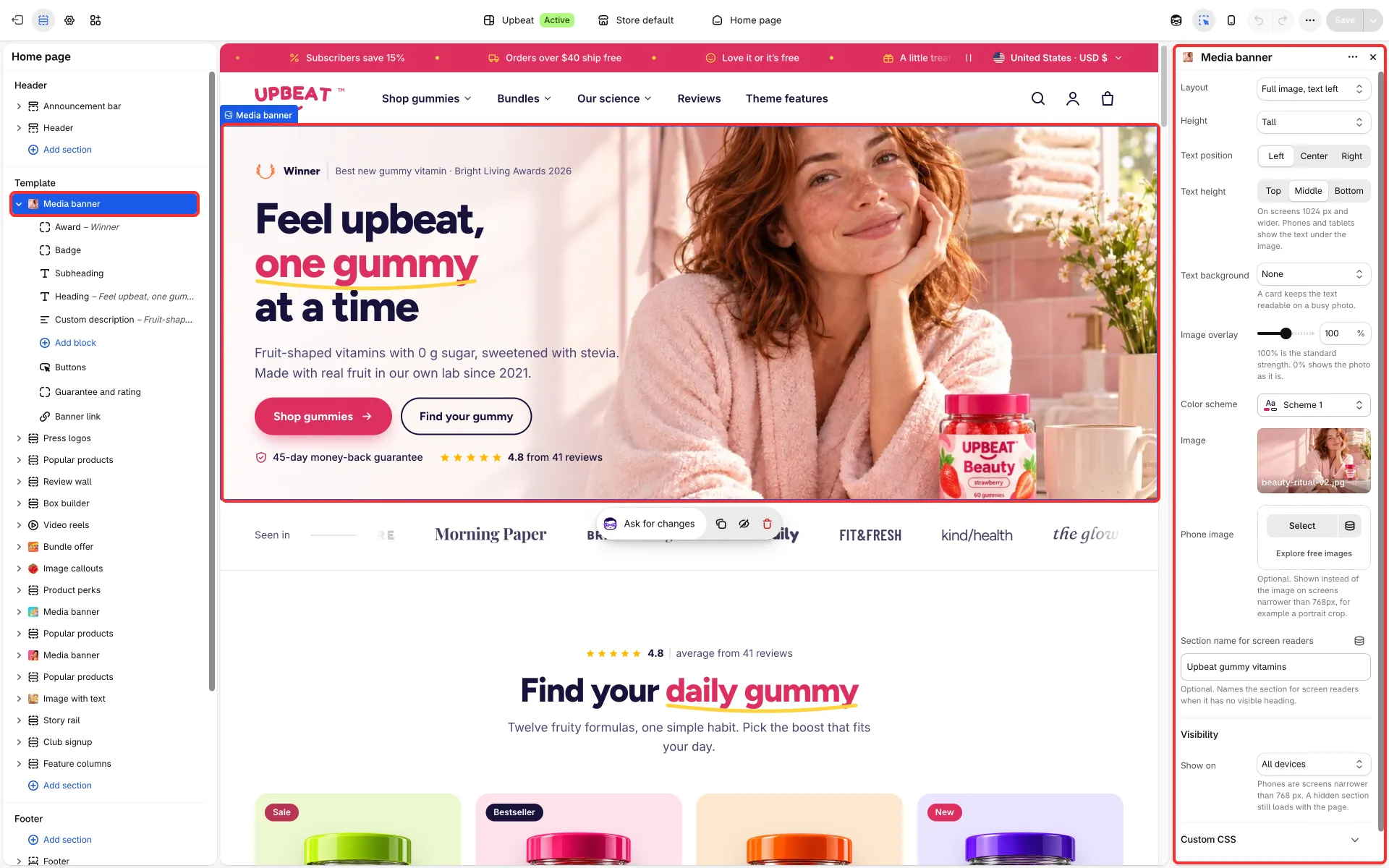
Main settings
Section titled “Main settings”- Layout: Full image, text left, Full image, text centered, Image and text side by side, Color background, Banner, image right or Banner, image left.
- Image, Phone image, and Video (the side-by-side layout can show a video instead of the image).
- In the full-image layouts: Height (tall, short or full screen), Text height (top, middle or bottom, from 1024 px) and Image overlay (0–200 %). With Full image, text left also Text position (left, center or right) and Text background (none, a card or frosted glass, for busy photos).
- In the side-by-side layout: Image position (left or right).
- Background, Show as a rounded card and Color scheme.
- Blocks: Buttons, Guarantee and rating and Countdown timer. Fixed blocks: Award, Badge, Subheading, Heading, Custom description and Banner link (makes the whole banner a link).
Good to know
Section titled “Good to know”- Phones and tablets show the text under the image.
- A hero in the first section loads first; replace the hero image before you publish, as the installed one is a grey placeholder.
- When the countdown ends, the banner hides its buttons, except in Banner, image right and Banner, image left. See Countdown timer.
- Its presets are Media banner and Banner with image.