Countdown timer
A block that counts down to a date and time in the store’s time zone. Use it in offers, banners and the announcement bar.
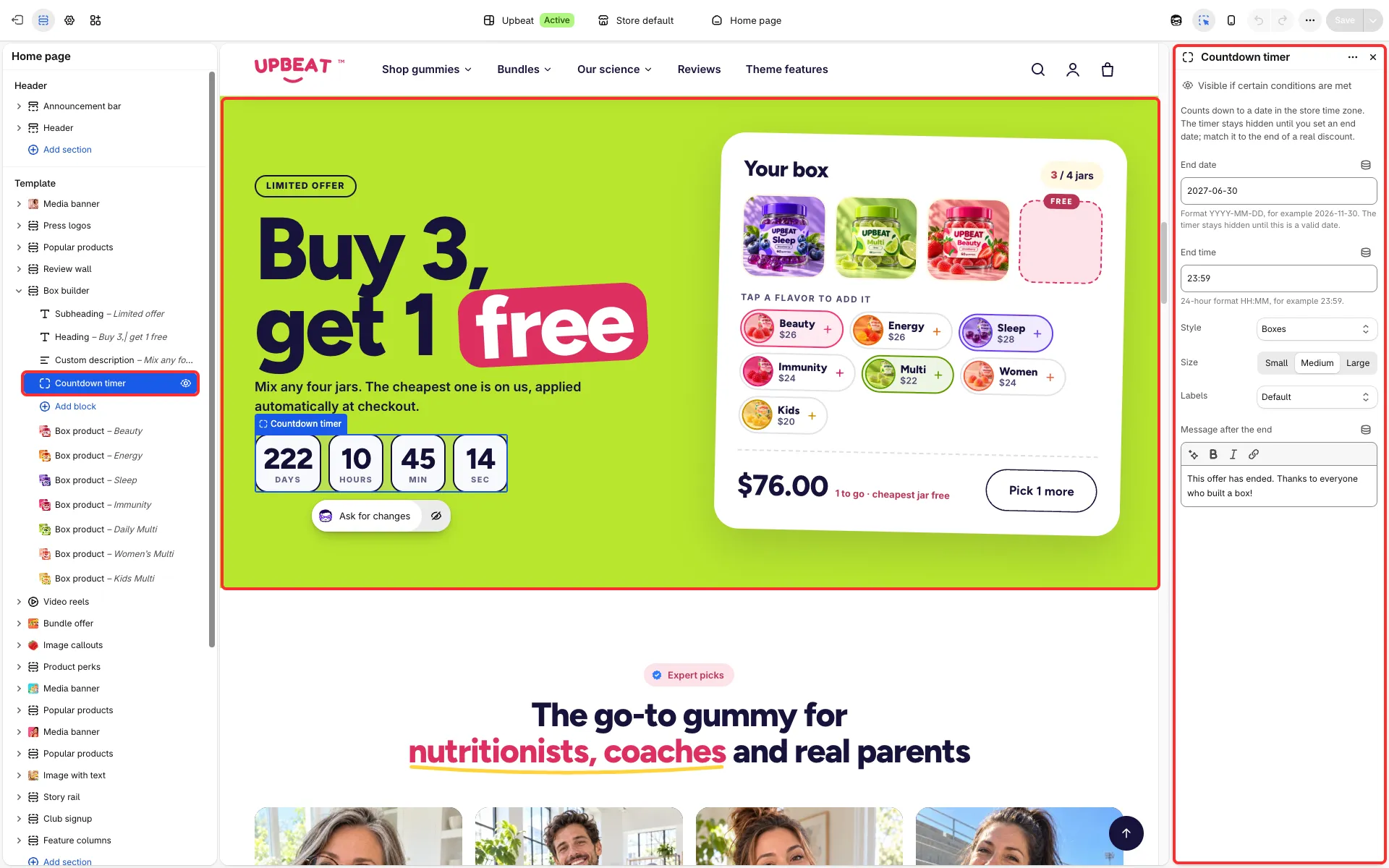
Main settings
Section titled “Main settings”- End date and End time (default 23:59). The timer stays hidden until you enter a valid End date.
- Style: Boxes, Compact line, Large numbers, Dark tiles, Accent tiles or Outlined tiles.
- Size: Small, Medium or Large. Labels: Default, Days, Hours, Minutes, Seconds, Days, Hours, Min, Sec, d, h, m, s or None (not for Compact line).
- Message after the end.
Good to know
Section titled “Good to know”- The timer ends once and does not start again by itself. Move the date forward to run an offer again.
- What happens at the end depends on where it sits: the bundle offer hides its price and buttons and shows your end message, the box builder becomes unavailable, and the media banner hides its buttons (except in its two “Banner” layouts).
- In the announcement bar with One at a time, the timer takes its turn among the messages; with Sale line with countdown it sits beside one message.
- It does not end your discount: set the discount’s end date in Discounts too.
- Screen readers always hear the units.