Product panel
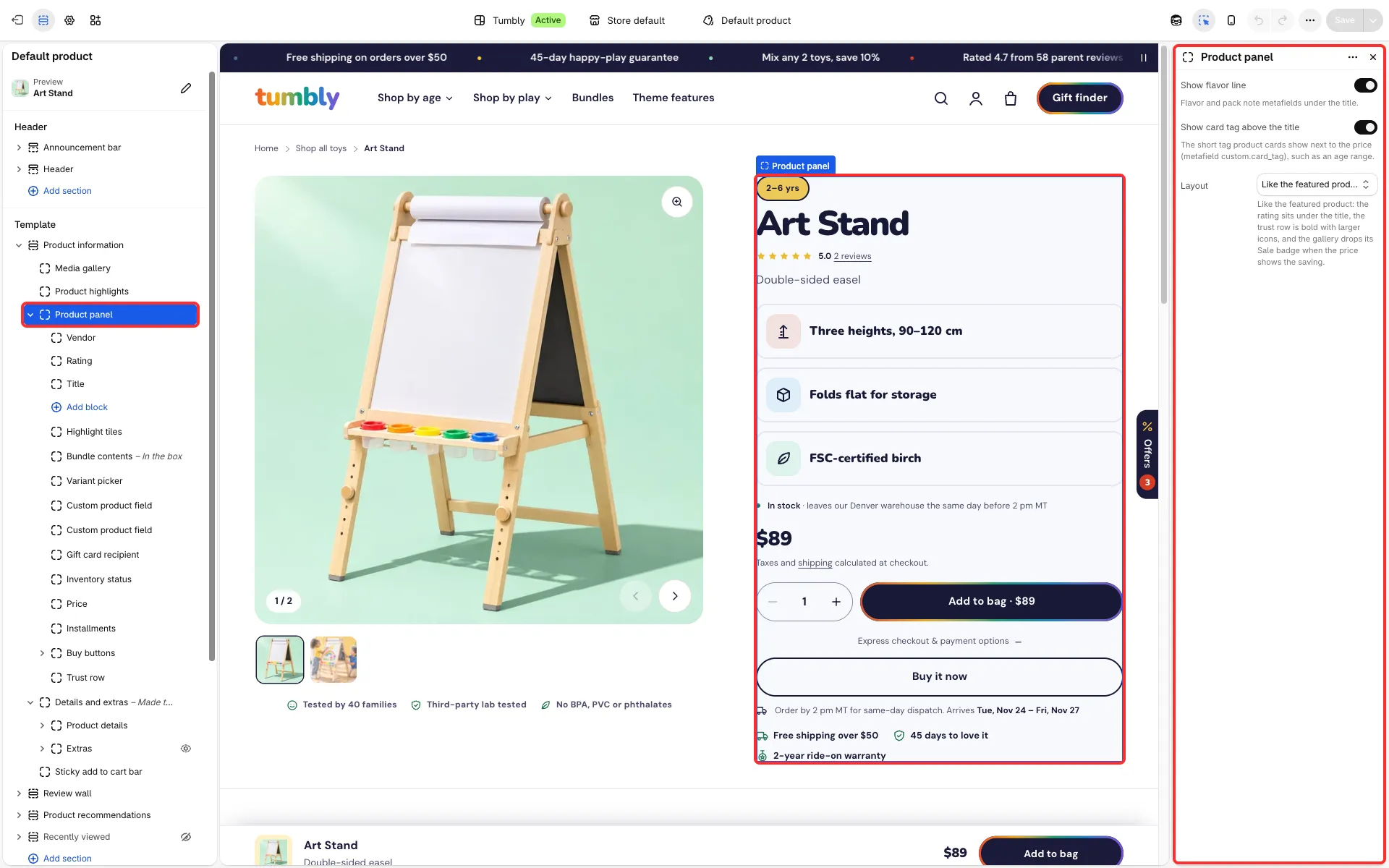
The buy area beside the gallery: title, price, options, buy buttons and a trust row. Add, reorder or remove its blocks to match how you sell.
Main settings
Section titled “Main settings”- Layout: Classic or Like the featured product (a short line under the rating, highlight tiles, the tax note under the price and bold trust perks).
- Show flavor line and Show card tag above the title (the product’s
custom.card_tag, for example “Ages 18 m – 5 yrs”, as a chip). - Blocks you can reorder or remove: Price, Installments (keep it right under the price), Product description, Bundle contents, Variant picker, Purchase options, Gift card recipient, Custom product field, Volume pricing, Inventory status, Buy buttons, Trust row, Highlight tiles, Custom Liquid and apps.
- Vendor: Show vendor and Link to the vendor’s products.
Good to know
Section titled “Good to know”- Variant picker, Purchase options, Gift card recipient and Buy buttons work once per panel: a second copy shows a note in the editor and stays hidden in the store, so remove it.
- Highlight tiles has Smaller tiles on phones so the buy button comes sooner.
- Price has Show tax and shipping note.
- Details of the other blocks: Variants and photos, Subscriptions, Custom fields and personalized products, Volume pricing, Buy buttons, stock and delivery, Gift cards.